
Should You Go 4K for Your Golf Simulator?
One of the most common questions we hear at SimCaddy is, “Should I go 4K?”
It is an understandable question. 4K is now part of almost every projector conversation, and it is easy to assume that more resolution automatically means a better golf simulator.
But choosing 4K is not really just a projector decision. It affects the computer, graphics card, simulator software settings, impact screen, room lighting, screen size, and even how you plan to use the room when you are not playing golf.
For some golfers, 4K is absolutely worth it. For others, a properly designed HD or WUXGA system will look excellent, run more smoothly, and deliver better overall value.
The right answer comes down to the full setup.
4K Is a System Decision
A 4K projector can display more detail than a standard HD projector. A typical 4K image is 3840 by 2160 pixels, while standard 1080p HD is 1920 by 1080. That added resolution can make course graphics look sharper, text easier to read, and the overall image more refined.
But the projector can only display what the rest of the system is capable of producing.
Your golf simulator computer has to render the image. The graphics card has to process it. The simulator software has to run smoothly at that resolution. The projector then has to display it properly. Finally, the impact screen and room lighting need to support the image quality you are paying for.
A 4K projector connected to a computer that cannot run simulator software properly at 4K will not deliver the experience people expect. You may still get an image, but it may require reduced graphics settings, lower frame rates, or a scaled down resolution. In that case, the benefit of the 4K projector becomes much less meaningful.
That is why we look at 4K as a complete system upgrade, not a single component upgrade.
When 4K Makes a Noticeable Difference
4K becomes more valuable as the image gets larger. On a larger impact screen, pixels are spread across more surface area, which makes the added detail easier to see. Course textures, trees, bunkers, menus, and scorecards can all look cleaner and more polished.
It also makes sense in a premium simulator room where the visual experience is part of the goal. For golfers who want the most immersive course graphics possible, 4K can add another level of realism when the computer, projector, screen, and room are all matched properly.
The difference is often more noticeable when you are standing close to a large screen. In many simulator rooms, players are only eight to twelve feet from the image. At that distance, a larger 4K image can look sharper and more refined than HD.
However, 4K does not automatically make every simulator better. On a standard sized impact screen, especially in a room with less controlled lighting, the difference can be smaller than expected. A bright, smooth, well configured HD system can still look excellent.
HD Is Still a Strong Choice
A properly built HD golf simulator remains a very good option for many homes.
Standard 1080p resolution is more than capable of delivering a clear, enjoyable image for practice, simulator rounds, and casual entertainment. It is easier on the computer, generally less expensive, and can provide very smooth performance with today’s golf simulator software.
This matters because golf simulation is not only about image detail. It is also about responsiveness, reliable ball flight visuals, stable software, and a system that works consistently every time you step into the room.
A sharp 4K image is great, but not if the computer is struggling to maintain performance. In many cases, a strong HD system with a quality impact screen, enough brightness, and the right graphics card will deliver a better overall experience than a poorly matched 4K setup.
For many golfers, the money saved by choosing HD can be invested in a better launch monitor, better turf, brighter projector, improved enclosure, or upgraded furniture. Those choices can have just as much impact on the overall simulator experience.
Where WUXGA Fits Into the Conversation
WUXGA is another resolution you will see when comparing golf simulator projectors. It is not 4K, but it can be a very practical option depending on the room.
WUXGA is 1920 by 1200 pixels. That gives it a slightly taller image than standard 1080p HD, which is 1920 by 1080. It uses a 16:10 aspect ratio instead of the more common 16:9 format used by most HD and 4K projectors.
The added height can be useful in a golf simulator because simulator software often includes more than just the course image. You may have shot data, scorecards, club information, menus, and player details on screen at the same time. A WUXGA projector gives you a little more vertical image space without requiring the same level of computer performance as 4K.
For a golf focused room with a slightly taller impact screen, WUXGA can be an excellent middle ground. It offers more usable image area than standard HD in the right layout, while remaining closer to HD in price and computer requirements.
It is not necessarily better than 1080p or 4K. It is simply another format that may fit the screen and room more effectively.
Aspect Ratio Matters More Than Most People Expect
Aspect ratio is the shape of the image. It is the relationship between the width and height of what the projector displays.
Most HD and 4K projectors use a 16:9 widescreen image. This is the same format used by most sports broadcasts, streaming services, movies, and television. It works very well for a simulator room that will also be used for entertainment.
WUXGA uses a 16:10 image, which is slightly taller. That can work well for golf simulator software and for screens that are a little taller relative to their width.
The important thing is matching the projector image to the actual shape of the impact screen. Golf simulator screens are often built around the room dimensions, ceiling height, enclosure size, and available hitting area. They are not always a perfect match for standard television formats.
When the projector and screen do not match, you can end up with unused screen space, black bars, or an image that needs to be cropped. You can often adjust the image, but filling the entire screen may mean losing important parts of the software display or distorting the image.
This is why a lower resolution projector with the right aspect ratio can sometimes produce a better result than a higher resolution projector that does not fit the screen properly.
Brightness and Lighting Can Matter More Than Resolution
Brightness is one of the most important parts of projector selection, especially in a golf simulator.
Projector brightness is measured in lumens. A lower brightness projector in a room with ambient light can look washed out, flat, and disappointing, even if it is 4K. A brighter HD or WUXGA projector may produce a more vibrant and usable image in that same space.
This is especially important in garages, basements with windows, multipurpose rooms, or any space where lighting cannot be fully controlled. Daylight, ceiling lights, wall colour, and reflective surfaces all affect how the image looks.
A bright image with good contrast will often make a bigger difference in daily use than a higher resolution image that cannot overcome the lighting conditions in the room.
The impact screen matters too. Screens have texture and weave because they are designed to absorb golf balls safely. Even with a high end projector, you will not see the exact same sharpness you would get from a television or dedicated theatre screen. A good screen will still look impressive, but it is important to build realistic expectations around what 4K will add.
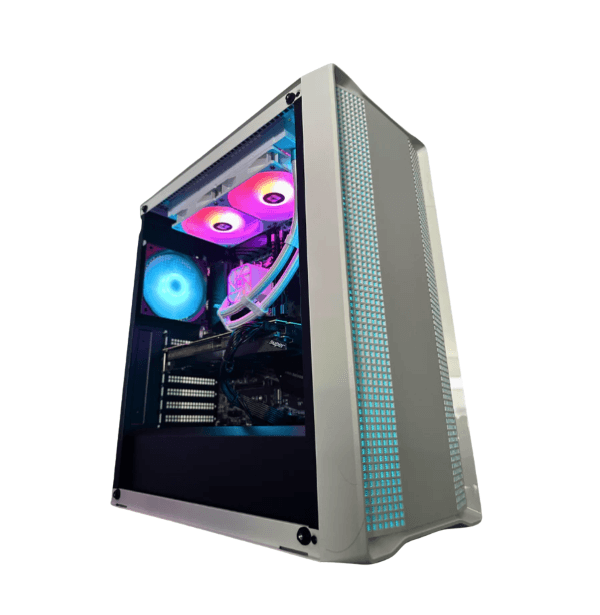
Going 4K is not just about choosing a 4K projector. Your golf simulator also needs a gaming PC with enough graphics power to run 4K course visuals smoothly and consistently.
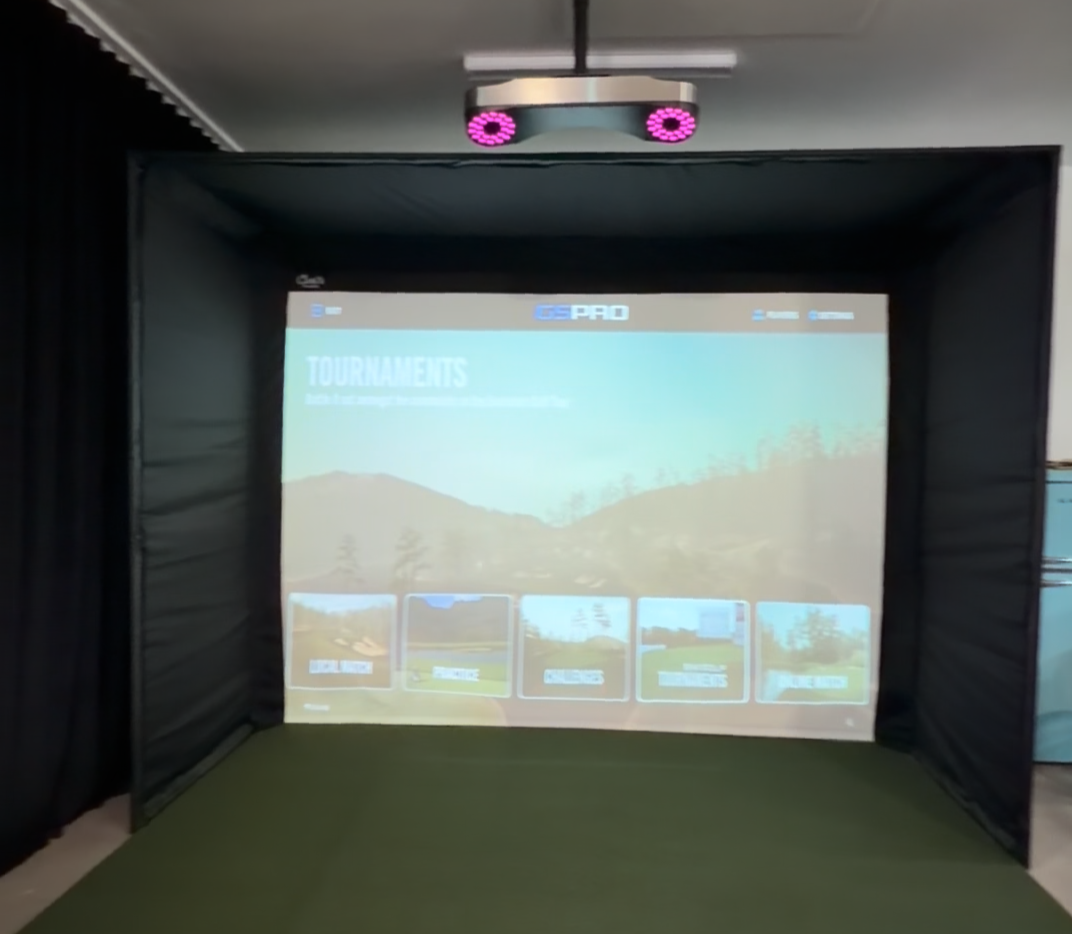
HD – 3000 Lumens BenQ AH30ST
In spaces with ambient light present, lower brightness can lead to a washed-out image and reduced clarity.
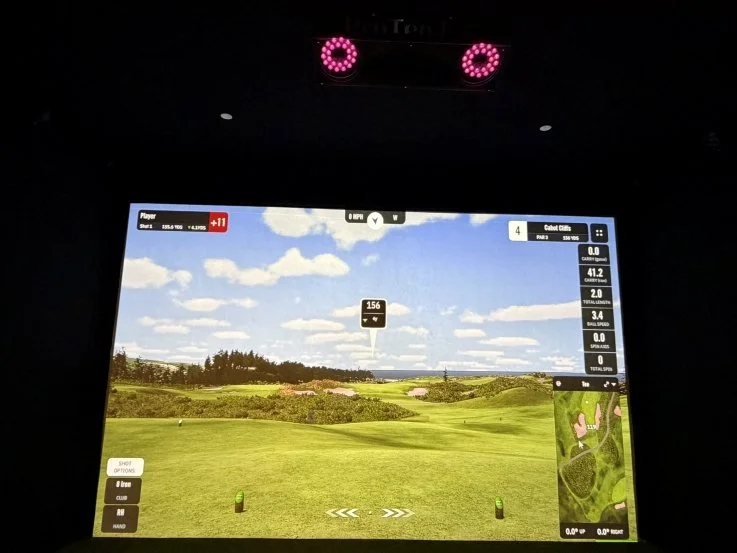
4K – 5100 Lumens BenQ LK936ST
Higher brightness combined with controlled lighting delivers a sharper, more vibrant image.
Think About How You Will Use the Room
One of the best reasons to choose 4K has nothing to do with golf.
Many simulator rooms become family rooms, sports rooms, and entertainment spaces. The same screen that hosts a practice session in the afternoon may be used for a hockey game, football game, movie night, or streaming series later that evening.
That is where 4K can become easier to justify. You are not investing in sharper golf graphics alone. You are also creating a larger screen entertainment experience for sports, movies, and television.
A 16:9 4K setup is especially well suited for that kind of room because most sports broadcasts and movie content are created in widescreen formats. When the room is used equally for golf and entertainment, 4K can add value well beyond the simulator software.
For a room used almost entirely for golf, that added value may not be as important. In that case, HD or WUXGA may be the better balance of performance, brightness, and budget.
Your Computer Has to Match the Plan
A projector can only display what the computer is capable of producing. Running golf simulator software in 4K requires significantly more graphics power than running the same software in HD or WUXGA. This usually means a stronger graphics card, more capable computer, and a higher overall system cost.
The computer is one of the most important parts of the 4K decision. If the goal is to run detailed simulator courses at high settings, while keeping ball flight smooth and the software responsive, the PC needs to be built for that job.
For an HD or WUXGA system, the computer requirements are more manageable. That can free up budget for other important components while still delivering a very good simulator experience.
This is where a properly designed system matters. The projector, PC, screen, software, and room should all support the same goal.
So, Should You Go 4K?
4K makes sense when you are building a larger premium simulator room, want the highest level of image detail, have the computer power to support it properly, and plan to use the space for sports, movies, and entertainment as well as golf.
HD makes sense when you want strong value, smooth performance, and a clean image in a standard sized simulator space. It remains an excellent choice for many golfers.
WUXGA can be a smart middle option when the room or impact screen benefits from a slightly taller image and the simulator is primarily focused on golf.
The best answer is not simply 4K or HD. It is choosing the right complete system for the room, the screen, the lighting, the computer, and the way you plan to enjoy the space.
The SimCaddy Approach
At SimCaddy, we do not believe every customer needs the most expensive projector or the highest specification on paper. We look at the full picture.
Your room dimensions, ceiling height, screen size, impact screen material, ambient light, simulator software, computer, launch monitor, budget, and plans for the room all matter.
4K can be a great investment in the right setup. HD can still deliver an outstanding experience. WUXGA can be the best fit for some golf focused rooms.
The goal is simple. Build a simulator that looks great, runs smoothly, and works reliably every time you step in to hit a shot, play a round, watch the game, or settle in for a movie.
Tom Murray is the Founder and President of SimCaddy, a golf simulator design and supply company serving customers across Canada. As a CTS-certified audiovisual professional, Tom combines his AV expertise with a passion for golf simulators, specializing in designing and building advanced systems for both residential and commercial spaces. His focus is on delivering immersive, high-quality solutions tailored to each client’s unique needs.